
How to burn ISO to USB?
Download Rufus from the following link :
https://rufus.ie/
What do you need:
1 You need an 8GB USB drive or larger. (USB Drive)
2 Rufus Application (ISO to USB )
3 ISO file you require to create the Bootable USB
Create bootable USB drive from ISO
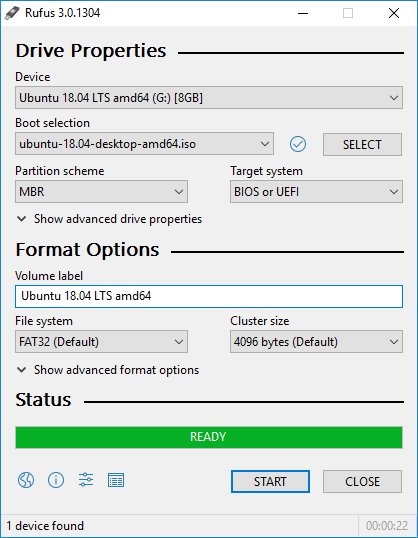
1 Open Rufus application.
2 Select as Device your USB drive.
3 Select ISO file you want to create bootable USB from.
4 Leave the rest of the Settings as Default,
5 Click Start and wait until Copy process ends.
6 Click Close, Now you have a bootable USB drive
Or skip all of this entirely
This guide exists because doing it yourself is fiddly. Every ArkPC Linux desktop and laptop arrives with the distro of your choice pre-installed, configured and tested in Australia on hardware we verify works with Debian-based and the other Linux systems we sell – no USB sticks, no boot menus, no driver hunting. Turn it on and it just works, backed by local support and a 1-year warranty.
Browse Linux laptops | Linux desktops | brand-new Linux laptops